
Overview
This page explains the configuration settings for related queries. You can improve search results with registered related queries. Related queries can be used as alternative terms for search terms.
Management Operations
Display Method
To open the related query configuration list page shown below, click [Crawler > Related Query] in the left menu.

Click the configuration name to edit it.
Creating Configuration
To open the related query configuration page, click the New button.
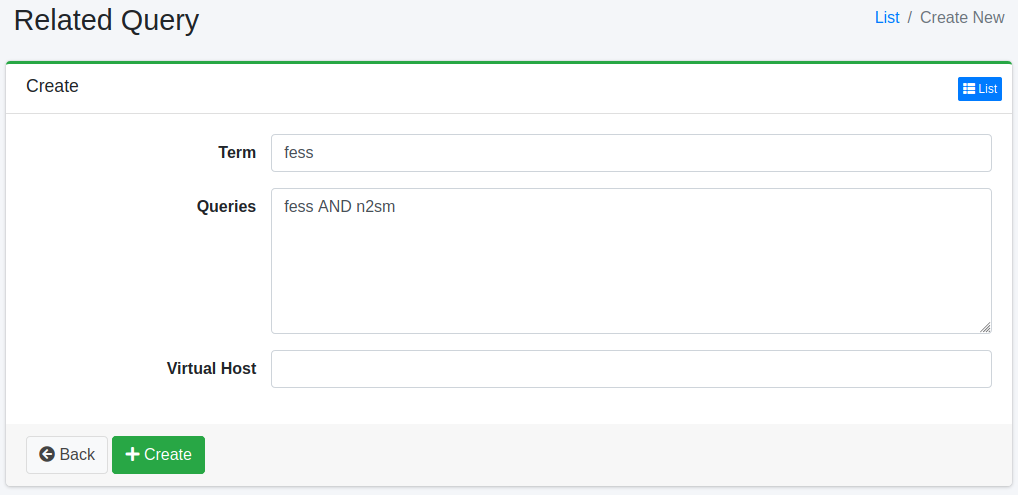
Configuration Items
Search Term
Specifies the search term to match with the search query.
Query
Specifies the query.
Virtual Host
Specifies the virtual host hostname. For details, refer to Virtual Host in the Configuration Guide.
Deleting Configuration
Click the configuration name on the list page, then click the Delete button to display a confirmation screen. Click the Delete button to remove the configuration.
Generating from Search Logs
Click the [Generate from Search Logs] button on the list page to create related queries from recent search logs. A search that the same user session makes shortly after another search (a typo followed by its correction, or a broad term followed by a more specific one) counts as a refinement. For frequently searched terms, the most common refinements become the related queries of the term.
Related queries apply to everyone and broaden every search for their term, so the generation is conservative:
Only searches a guest can see are used. A search log is read only when all of its roles pass
suggest.search.log.permissions(the same setting as suggest).Search terms that contain a field filter such as
label:"x", operators, wildcards,sort:or a leading+/-are not used.Words registered under [Suggest > Bad Word] are used neither as terms nor as related queries.
A term and each of its related queries must come from at least
related_query.generate.min.sessionssessions, and the refinements must have hits.Entries are generated separately for each virtual host. Search logs without a virtual host are treated as the default host.
Terms that already have related queries are not changed (the result shows how many were skipped), and no more entries are created than the related query cache can load (
page.relatedquery.max.fetch.size).
Generated related queries can be edited or deleted like those registered by hand. They cannot be generated while “Search Log” or “User Log” is disabled under [System > General], and a second run cannot start while one is in progress.
The following settings in fess_config.properties adjust the generation.
| Property | Description | Default |
|---|---|---|
related_query.generate.days | Days of search logs to read | 30 |
related_query.generate.term.size | Maximum number of terms per virtual host | 100 |
related_query.generate.query.size | Maximum number of related queries per term | 5 |
related_query.generate.min.sessions | Minimum number of sessions in which a term and its related query must appear | 3 |
related_query.generate.session.interval | Interval within which a search counts as a refinement (minutes) | 10 |
related_query.generate.seed.log.size | Maximum number of search logs read per term | 1000 |
related_query.generate.seed.session.size | Maximum number of sessions read per term | 200 |
related_query.generate.log.fetch.size | Maximum number of follow-up search logs read per term | 2000 |
related_query.generate.query.min.length | Minimum length of a term and a related query (characters) | 2 |
related_query.generate.query.max.length | Maximum length of a term and a related query (characters) | 50 |