
Overview
This page explains the configuration settings related to document boost. By configuring document boost settings, you can position documents at the top of search results regardless of search terms.
Management Operations
Display Method
To open the document boost configuration list page shown below, click [Crawler > Document Boost] in the left menu.
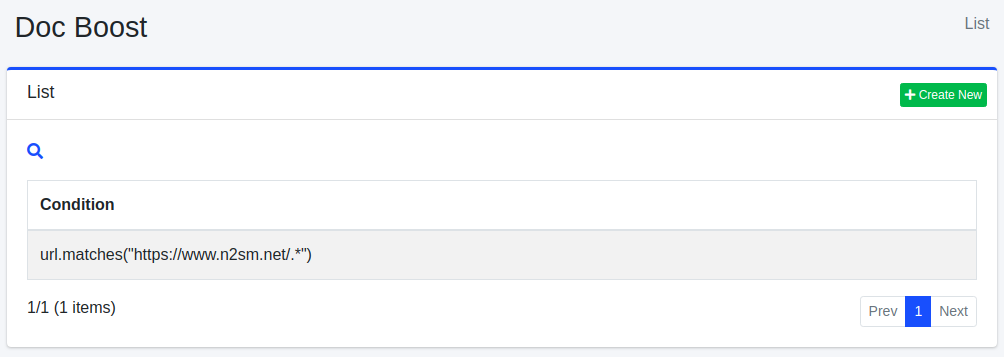
Click the configuration name to edit it.
Creating Configuration
To open the document boost configuration page, click the New button.
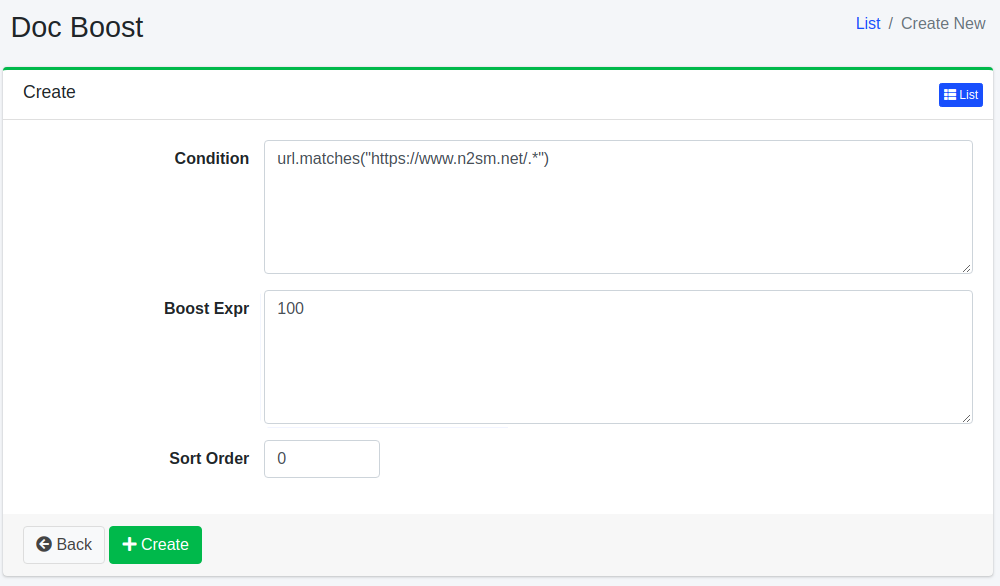
Configuration Items
Condition
Specifies the condition for documents to position at the top. For example, to display URLs containing https://www.n2sm.net/ at the top, write url.matches(”https://www.n2sm.net/.*”). Conditions are written in the syntax of the scripting engine specified in “Script Type” below.
Boost Value Expression
Specifies the weighting value for documents. Expressions are written in the syntax of the scripting engine specified in “Script Type” below.
Script Type
Specifies the scripting engine used to evaluate the condition and boost value expression. New configurations are prefilled with javascript. Selecting groovy requires the fess-script-groovy plugin. If left blank, the expressions are evaluated as Groovy.
Warning
Under JavaScript, write the condition and the boost value expression as bare expressions with no trailing semicolon. Text that can only be parsed as a block of statements evaluates to null unless it contains an explicit return. See How Scripts Are Evaluated (in JavaScript Scripting Guide).
Sort Order
Configures the sort order for document boost.
When Rules Are Applied
Document boost rules are evaluated when a web crawl or a file crawl registers a document in the index. They are not applied to data store crawls. Adding, changing or deleting a rule does not change the boost of documents that are already in the index.
When “Check Last Modified” in [System > General] is enabled (the default), a document whose content has not changed is not registered in the index again by a recrawl, so its boost is not evaluated again. To apply a new or changed rule to existing documents, delete those documents from the index (see Search) and crawl again. A document that is registered again, for example because its content has been updated, is evaluated at that time. If “Check Last Modified” is disabled, every document is registered again on each crawl, so the rules are evaluated every time.
Deleting Configuration
Click the configuration name on the list page, then click the Delete button to display a confirmation screen. Click the Delete button to remove the configuration.