
Overview
You can register personal names, proper nouns, technical terms, and other words for morphological analysis.
This dictionary is for Japanese (ja/kuromoji.txt) and is used only for the analysis of the _ja fields such as content_ja. Saving a change is not enough for it to take effect in searches. See Applying Dictionary Changes for how to apply it. Because this dictionary takes effect at indexing time, documents that are already in the index are not affected until they are crawled again.
Management Operations
Display Method
To open the Kuromoji configuration list page shown below, click [System > Dictionary] in the left menu, then click kuromoji.
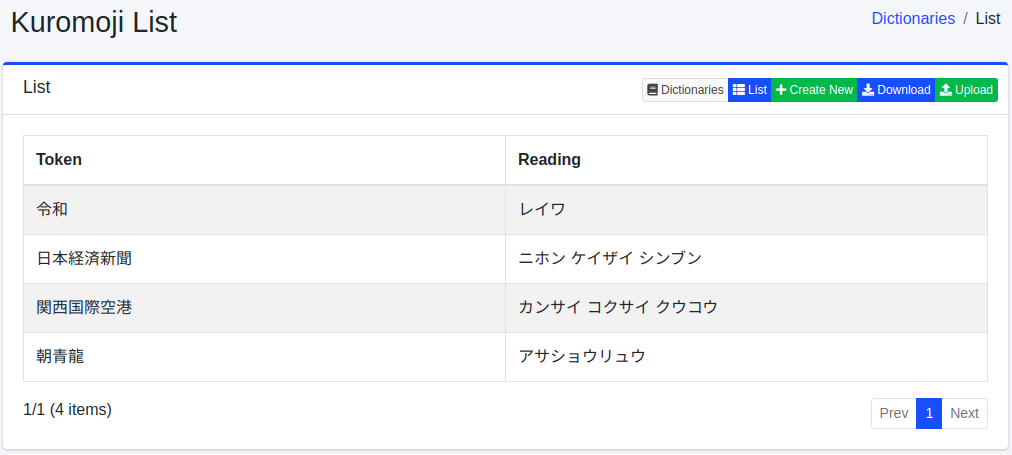
Click the configuration name to edit it.
Configuration Method
To open the Kuromoji configuration page, click the New button.
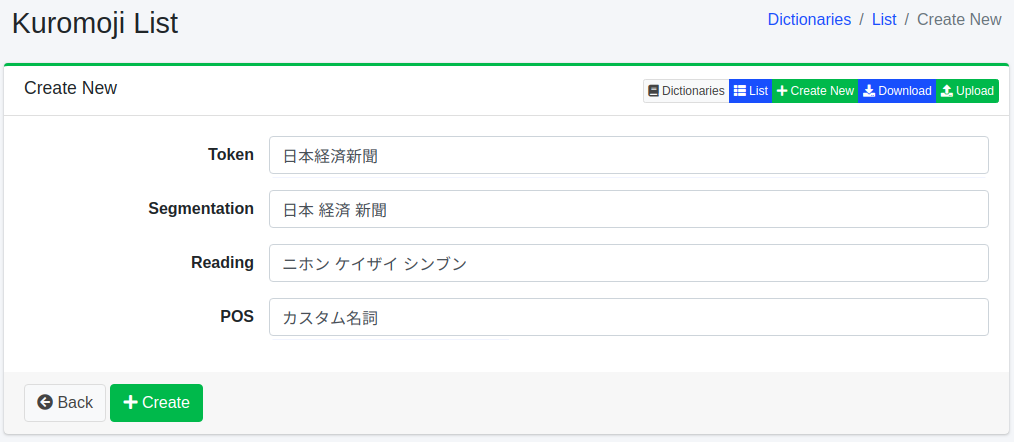
Configuration Items
Token
Enters the word to process in morphological analysis.
Segmentation
When a word is composed of compound words, you can make it searchable even when searching with segmented words. For example, by entering “全文検索エンジン” as “全文 検索 エンジン”, you can search with the segmented words.
Reading
Enters the reading of the word entered as a token in katakana. If segmentation is used, enter the reading in segmented form. For example, enter “ゼンブン ケンサク エンジン”.
POS
Enters the part of speech of the entered word.
Download
You can download in Kuromoji dictionary format.
Upload
You can upload in Kuromoji dictionary format. The Kuromoji dictionary format uses comma (,) delimiters: “token,segmented tokens,reading of segmented tokens,part of speech”. Segmented tokens are separated by spaces. If segmentation is not needed, the token and segmented tokens are equal. For example:
Warning
Uploading replaces the content of the dictionary with the content of the uploaded file. Any word that is not in the file, including words registered on the screen, is removed. If necessary, download the dictionary first and include its content in the file you upload.
Note
The bundled dictionary already contains the two examples above (“朝青龍” and “関西国際空港”). In the analysis of content_ja, characters are replaced by the character replacement dictionary ja/mapping.txt before morphological analysis (see Mapping Dictionary). The bundled ja/mapping.txt contains 龍 => 竜, so “朝青龍” is replaced with 朝青竜 before it is analyzed; it does not match “朝青龍” in the dictionary and is split into 朝 青 竜. To check the effect of a registration, use a word that is not in the dictionary and does not contain a character replaced by ja/mapping.txt.