
This page is generated by Machine Translation from Japanese.
Data store configuration
You can crawl databases in Fess . Here are required to store settings.
How to set up
In Administrator account after logging in, click menu data store.
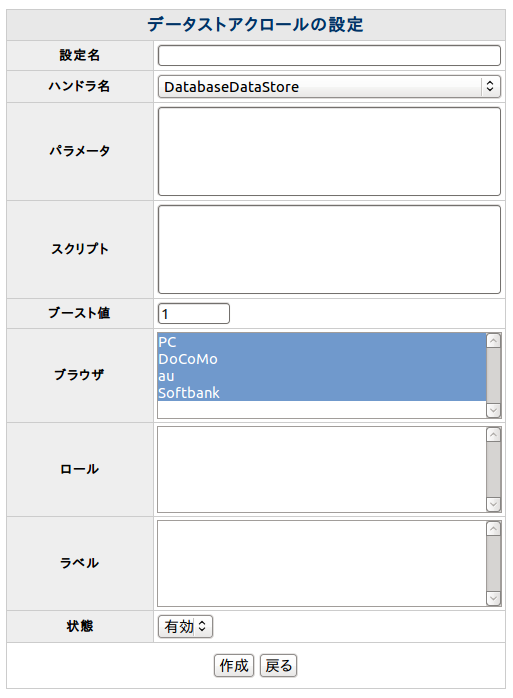
As an example, the following table database named testdb MySQL, user name hoge, fuga password connection and the will to make it.
Here the data is put something like the following.
Parameter
Parameter settings example looks like the following.
Parameter is a “key = value” format. Description of the key is as follows.
| driver | Driver class name |
| URL | URL |
| username | To connect to the DB user name |
| password | To connect to the DB password |
| SQL | Want to crawl to get SQL statement |
Script
Script configuration example looks like the following.
Parameter is a “key = value” format. Description of the key is as follows.
Side of the value written in OGNL. String, tie up in double quotation marks. Access in the database column name, its value.
| URL | URLs (links appear in search results) |
| host | Host name |
| site | Site pass |
| title | Title |
| content | Content (string index) |
| cache | Content cache (not indexed) |
| Digest | Digest piece that appears in the search results |
| anchor | Links to content (not usually required) |
| contentLength | The length of the content |
| lastModified | Content last updated |
Driver
To connect to the database driver is needed. keep the jar file in webapps/fess/WEB-INF/cmd/lib.
Display parameters
Set the following in the webapps/fess/WEB-INF/classes/app.dicon if you see the item value, such as latitude_s in the search results. After adding to $ {doc.latitude_s}, searchResults.jsp;