
You can sort search results by specifying fields such as search date and time.
Sort Target Fields
By default, you can specify the following fields for sorting:
| Field Name | Description |
|---|---|
| created | Crawled date and time |
| content_length | Crawled document size |
| last_modified | Last modified date and time of the crawled document |
| filename | File name |
| score | Score value |
| timestamp | Date and time when the document was indexed |
| click_count | Number of times the document was clicked |
| favorite_count | Number of times the document was favorited |
Table: Sort Target Field List
You can also add your own fields as sort targets. To do so, specify the field names as a comma-separated list in query.additional.sort.fields in fess_config.properties (empty by default). The fields specified here are added to the standard fields listed above and become available for sorting. Note that a field to be sorted on must already be registered (indexed) in the index.
Usage
You can select sort conditions when searching. Sort conditions can be selected in the search options dialog displayed by clicking the Options button.
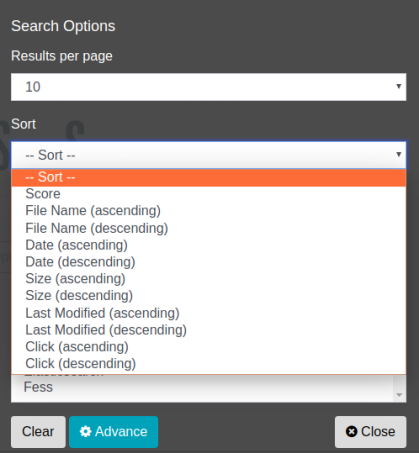
To sort using the search field, enter “sort:field_name” in the search form, separating sort and the field name with a colon (:).
The following sorts documents containing fess by document size in ascending order:
To sort in descending order, append .desc to the field name:
The suffix that can be appended to a field name is .asc (ascending) or .desc (descending); if it is omitted, ascending order is used.
To sort by multiple fields, specify them separated by commas as follows. The field specified first takes priority, and documents that have the same value for it are then ordered by the next field:
Note
If you specify a field name that is not in the sort target field list, or a sort order other than asc or desc, the search will result in an error.