
The Advanced Search page enables you to perform more advanced searches by combining multiple conditions.
Usage
The Advanced Search page can be accessed from the Advanced Search link in the search options on the search screen. When you open it from the search results screen, the search keywords you have already entered are carried over to the All These Words field.
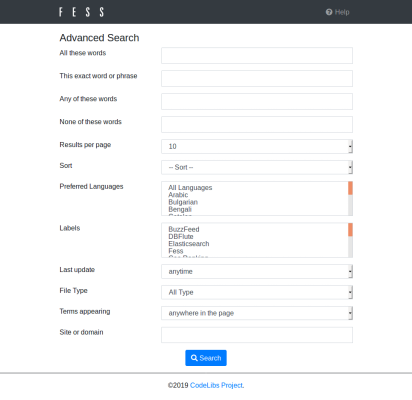
Enter conditions in each field and click the Search button at the bottom of the page to execute your search. The multiple fields you enter are combined into a single search condition.
Field List
All These Words
Searches for documents that contain all of the words you enter (AND search). You can specify multiple words separated by spaces.
This Exact Phrase
Searches for documents that contain the string you enter exactly, including word order (phrase search). Because the entire string, including spaces, is treated as a single phrase, you cannot search word by word.
Any of These Words
Searches for documents that contain any of the words you enter (OR search). You can specify multiple words separated by spaces.
None of These Words
Searches for documents that do not contain the words you enter. You can specify multiple words separated by spaces, and all of the specified words are excluded from the search results.
Results per Page
Specifies the number of search results to display per page. You can choose from 10, 20, 30, 40, 50, or 100. If not specified, the default number of results (10 by default) is used.
Sort
Specifies the criteria for sorting search results. You can choose from by Score, by Filename, by Date, by Size, and by Last Modified, and you can specify ascending or descending order for each. Sorting by Click Count or by Favorite Count can be selected when the corresponding feature is enabled.
Preferred Languages
Specifies the language to prefer in search results. You can also select multiple languages. If you select All Languages, no specific language is preferred.
Labels
Filters search results by label. You can also select multiple labels. This option is not displayed if no labels are registered or if there are no labels that the current user can access.
Last Modified
Filters search results by the document’s modification date and time. You can choose from Anytime, Past 24 hours, Past week, Past month, and Past year.
File Type
Filters search results by the document’s file type. You can choose from Any format, HTML, PDF, MS Word, MS Excel, and MS PowerPoint.
Search Target
Specifies the target to search. You can choose from Anywhere in the page, in the title of the page, and in the URL of the page. If you specify in the title of the page or in the URL of the page, the words you enter are searched only within the title or URL.
Site or Domain
Filters search results by the site or domain you enter. Specify this when you want to search only documents contained in a specific site or domain.